How to Take a Better ID Photo: A Few Simple Tips
August 7, 2026
"How to make your ID photo look better" — have you ever searched something like that? Whether it's a headshot for a job application, a LinkedIn profile, or a company badge, everyone wants to look a little better in the photo.
But an ID-style photo has one job a casual social photo doesn't: people need to recognize you at a glance. So how much can you actually edit it? To answer that, we first need to figure out what people actually mean by "looking better."
What people actually mean by "looking better"
When people ask for a flattering ID or resume photo, they usually mean smoother skin, a sharper jawline, bigger eyes: the kind of polish filters and beauty apps have made second nature on social media. It's tempting to bring that same instinct to a resume or ID photo.
But an ID photo needs the opposite.
An ID photo's first job is to still look like you
A resume photo, an employee badge, or a company profile picture isn't held to the same strict standard as a passport, but it shares the same underlying job: whoever looks at it needs to be able to recognize you.
If an interviewer meets you in person and the photo looks like a different person, that mismatch reflects worse on you than an average photo would. For official documents like passports, edited photos generally aren't accepted at all. This applies to Portraify too: passport and other government ID submissions require an unedited original photo, since AI-generated images aren't accepted there. Portraify's results are meant for resumes and profiles, not official document submissions.
In other words, "looking better" for an ID-style photo needs a different goal than "looking better" on social media.
Good vs. overdone: what's the actual difference?
An ID photo isn't off-limits to editing. The question is simple: does the change show you on a good day, or does it change your facial proportions?
- Better lighting evening out skin tone: ✅ fine
- A flattering angle or posture: ✅ fine
- A softer, more relaxed expression: ✅ fine
- Skin smoothed until texture disappears: ❌ not fine
- Jawline or eyes reshaped: ❌ not fine
The fine changes capture the best version of the real you. The not-fine ones create a gap between the photo and your face that someone will eventually notice.
Why Portraify doesn't smooth skin or reshape faces
Portraify generates resume and profile photos from the pictures you upload, but it deliberately skips the kind of beautifying edits that reshape a face or erase skin texture. Every result also runs through a likeness check against your original photos. If none of the generated results clear that bar, you still get the highest-scoring one, flagged with a quality warning.
That's not a missing feature, it's a deliberate stance for this kind of photo. In a job search or a new role, a photo that doesn't match your in-person impression works against you, not for you. In that context, looking authentically like your best self matters more than looking edited.
Honest ways to look better, no filters required
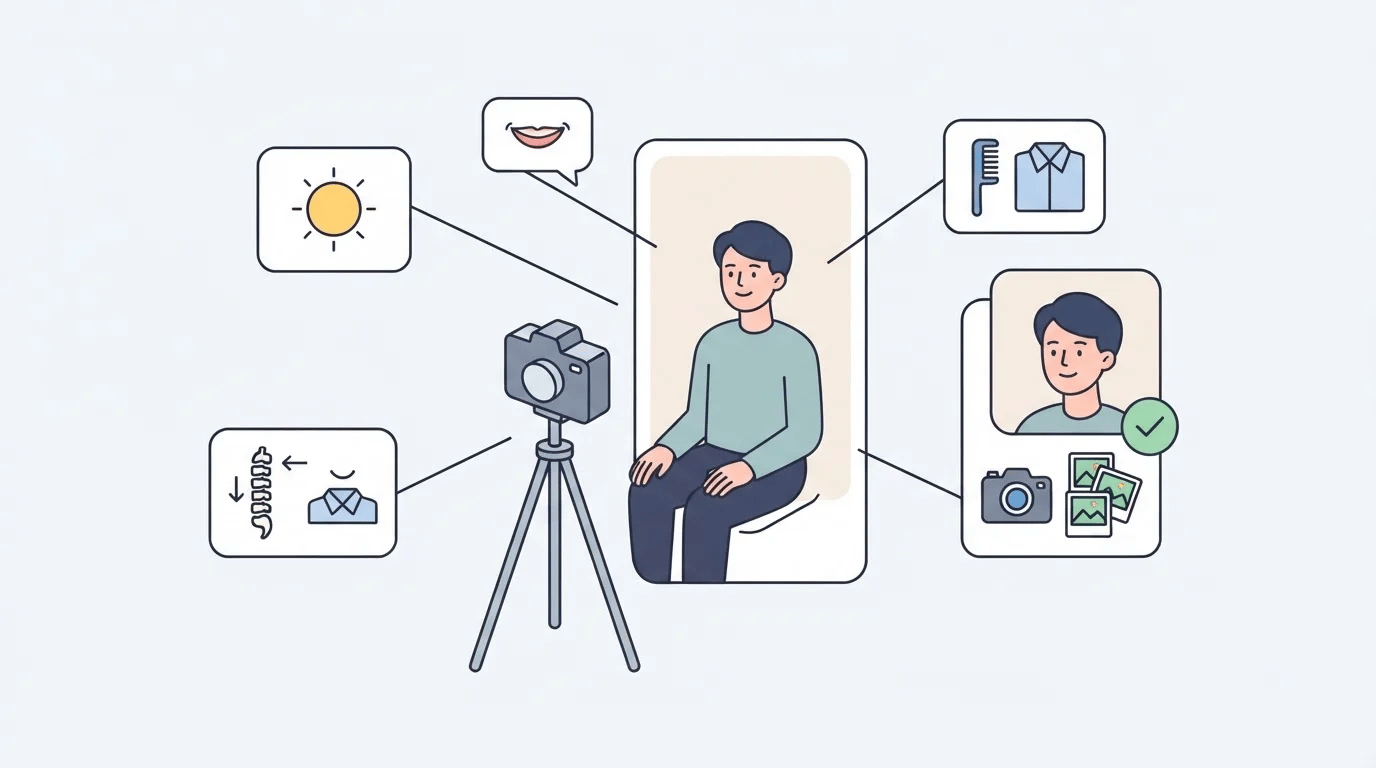
A few small things make a bigger difference than people expect:
- Face the light. Light from above or the side tends to carve harsh shadows. Soft, even light from the front (or slightly above) is far more forgiving.
- A slight smile is enough. You don't need a big grin, just relaxed eyes and the corners of your mouth lifted a little. Thinking about something you enjoyed a moment ago usually reads more natural than a forced smile.
- Fix your posture. Tucking your chin slightly and dropping your shoulders changes how your jawline reads in a photo more than any filter will.
- Tidy the frame. Flyaway hair or a rumpled collar pulls attention away from your face more than people expect.
- Take more than one shot. Don't settle for the first frame. A few variations of expression give you room to actually pick the best one instead of hoping for the best.
It's just choosing the version of you that's already there. Too bad most people skip these small steps and reach straight for a retouching app instead...
Where chasing "flattering" backfires
Overcorrecting for a flattering photo tends to cause its own problems:
- Smoothing skin so much that colleagues say you look like a different person in person
- Reshaping a jawline until your badge photo and your actual face don't quite match
- Reusing the same heavily-edited photo for years instead of updating it, because it's the "best" one you have
An ID or resume photo isn't a one-time project, it needs the occasional refresh. A photo that's honestly good today will serve you longer than a heavily edited one from years ago that you're reluctant to replace.
Quick FAQ
Can I still fix uneven skin tone in an ID photo? Yes, within reason. Adjusting lighting or making light tonal corrections that keep your skin's texture intact is fine. If it starts to look airbrushed, you've gone too far.
Can an AI-generated ID photo be used for official documents? Generally, no. Passports, visas, and similar government submissions require an unedited original photo. Treat AI-generated results as suited for resumes, LinkedIn, and internal company profiles, not documents with strict photo requirements.
Can Portraify make a "flattering" photo? Yes, but not by reshaping your face or smoothing away skin texture. Portraify checks every result for likeness against your original photos, and the goal is to capture the best, most polished version of how you actually look, in a form that works as a resume or profile photo.
Wanting your ID photo to look a little better than average? That's just human nature. The honest way to get there isn't heavier editing, it's lighting, expression, and posture done well before the photo is even taken. Portraify turns a few photos you already have into a resume or profile photo that still looks unmistakably like you, just at your best. Try it yourself and see how it looks!